Want to hear what the ghosts are rehearsing? Sing with them, free on TestFlight. Join the beta (version 1.0 (6); this invitation is good through January 9, 2027).
You can play on iPhone or Apple Watch, and on Apple Watch without an iPhone. On iPhone Duo, the graveyard stays on one leaf and the night sky carries on past the fold.


Can't get the ghost to sing? Start here.
How do I play?
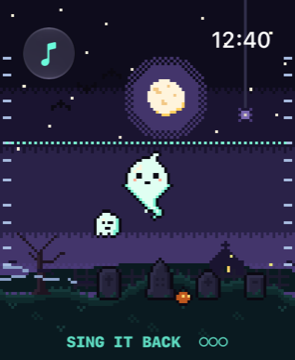
Touch and hold anywhere and the ghost sings. On Apple Watch, tilt your wrist toward you to go higher and away to go lower; turn the Digital Crown to change its voice. On iPhone, tip the phone up to go higher and down to go lower, and slide your finger to the right for a wilder wail.
Why does every note sound right?
The scale keeps you in tune: each note snaps to the nearest note of a spooky scale, and you'll feel a tick on your wrist at each new note. Choose Free glide in settings (the music-note button) for a true theremin slide.
Who are the other ghosts?
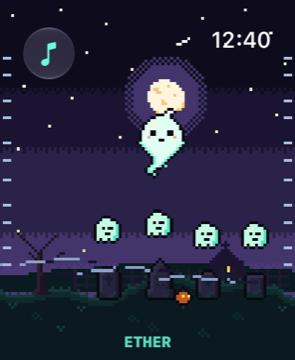
Go quiet for a few seconds and a ghost may rise from its gravestone and hum a short tune. Its notes light up as it hums, then the next note it wants glows. Sing the tune back and it joins your choir, singing along softly under every note you play, and teaches you its voice. Touch a ghost in your choir to sing in its voice; touch it again to go back to your own. Four ghosts wait under the graves. If you miss, it simply hums again.
The sound stopped
Raise your wrist and touch the screen: the ghost picks up again whenever you sing. Check the volume (on Apple Watch, in Control Center) and that Sound isn't switched off in the settings sheet (the music-note button).
Can I use headphones?
On iPhone, yes: any headphones work. On Apple Watch, the ghost sings through the watch's own speaker.
Does it need an iPhone?
No. Ghost Note runs fully on Apple Watch. The iPhone version plays on its own too.
Accessibility
With VoiceOver, use the "Sing" action to start and stop, and swipe up or down to change the note.
Contact
Found a bug or have an idea? Email studio@releaf.site.